Telegram Guide · ⏱ 2 min read · Updated August 2026

How to Fix “This Channel Can’t Be Displayed” on Telegram

Telegram hides certain channels behind a sensitive content filter that is switched on by default on iPhone — and cannot be turned off from the iOS app. Here is why it happens, and the five steps that fix it.

Short answer

Open web.telegram.org in a browser → Settings → turn on “Show Sensitive Content” → confirm with Disable → restart the app.

Jump to the full steps ↓

The Error You’re Seeing

Telegram shows

“This channel can’t be displayed”

Also appears as “This group can’t be displayed”, “Sorry, this channel is not accessible” or “Sorry, this group is not accessible” — all the same cause, all the same fix.

If you tapped an invite link and got this message, nothing is broken and the channel has not been deleted. The channel exists — Telegram is simply refusing to render it for your account because it is flagged as sensitive content, and your account currently has the filter enabled.

Why It Happens Mostly on iPhone

Telegram applies a sensitive content filter to public channels, groups and bots that are flagged as adult, graphic or otherwise age-restricted. The filter limits what those channels can show you, and on some accounts it hides them entirely.

The reason iOS users hit this constantly is that Apple’s App Store rules restrict how adult content can be exposed inside an iOS app. To stay compliant, Telegram ships the filter enabled by default on iPhone and iPad, and — this is the part that traps people — does not let you turn it off from inside the iOS app itself. You can search the iPhone settings menu as long as you like: the toggle is not there.

That is why the fix below runs through a browser instead. The setting lives at the account level, not the device level, so changing it once from any browser propagates to every device where you are logged in, iPhone included.

How to Disable the Sensitive Content Filter

You must be 18 or older to change this setting. It takes about two minutes and you only ever need to do it once per account.

Log in to Telegram Web

Open web.telegram.org in any browser — on your computer or on the phone itself — and sign in with your phone number. Telegram Desktop works too.

Do not look for this in the iPhone app: the option is not there, which is the whole reason this fix needs a browser.
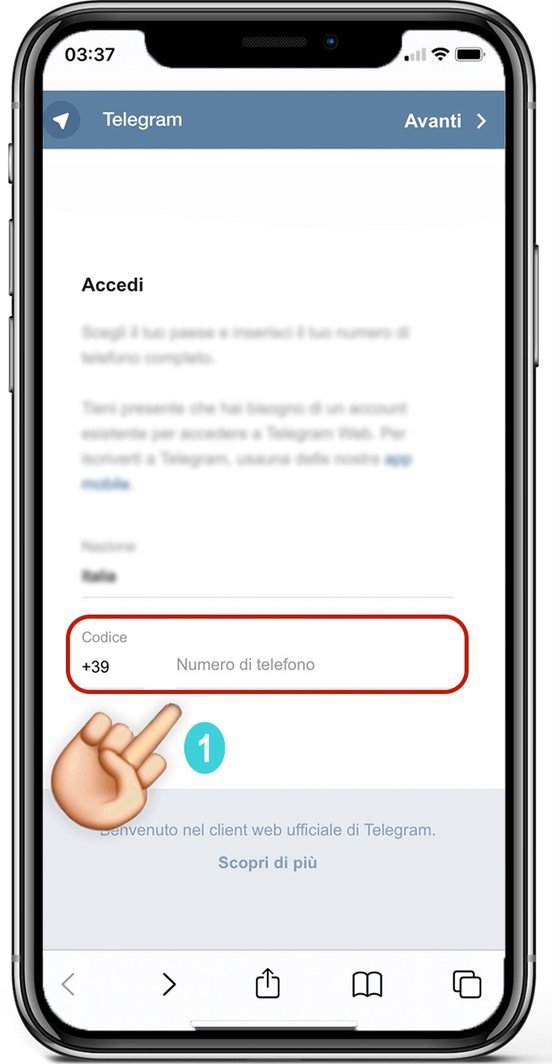
Telegram Web login screen with the phone number field highlighted

Open the menu and go to Settings

Tap the menu button () in the top corner, then choose Settings from the dropdown.
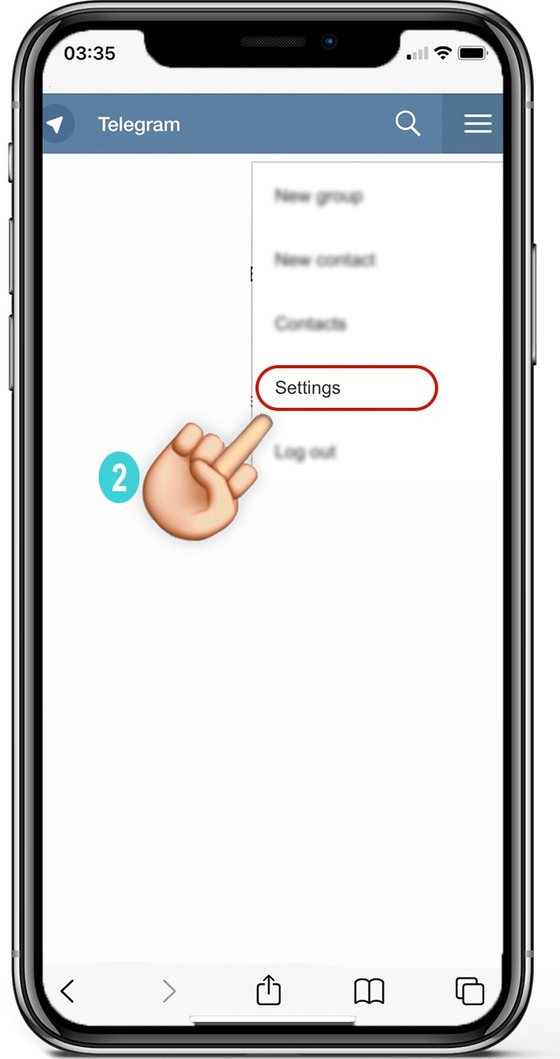
Telegram Web menu open with the Settings entry highlighted

Turn on “Show Sensitive Content”

Scroll down the Settings list to the bottom and flip the Show Sensitive Content toggle on.

On a newer Telegram Web layout? The same option lives under Settings → Privacy and Security → Sensitive Content, where it is labelled Disable filtering. Enabling it does exactly the same thing.
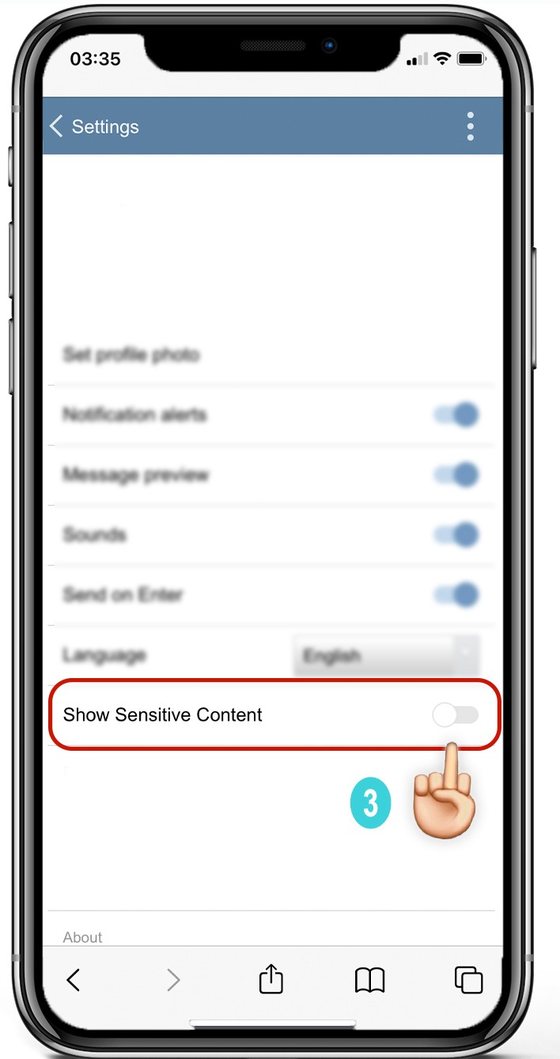
Telegram Web settings with the Show Sensitive Content toggle highlighted

Confirm with “Disable”

A dialog titled Disable filtering appears, warning that Telegram will display sensitive media in public channels on all your connected devices. Tap DISABLE to confirm.

The wording trips everyone up, so read it once more: you are disabling the filter, not the content. That is what makes hidden channels visible again.
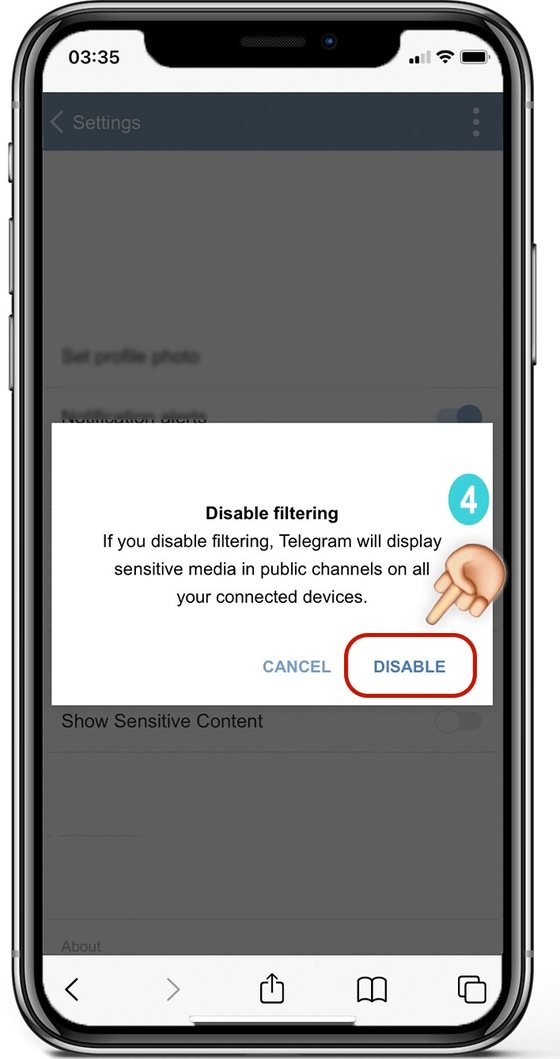
Telegram Disable filtering confirmation dialog with the DISABLE button highlighted

Fully restart the Telegram app

Close Telegram completely on your phone — swipe it away from the app switcher, don’t just switch to another app — then reopen it and open the channel link again. It will load normally.

Still not working? Give it a minute and restart the app a second time — the setting syncs from Telegram’s servers, not instantly from your phone. Also check that you are logged into the same account in the browser as on your phone: the filter is per account, so changing it on a second account does nothing for the first. Note that some channels are blocked for legal reasons in specific countries, and no setting will reveal those.

Frequently Asked Questions

Yes, exactly the same. Telegram uses slightly different wording depending on what you are opening and which app version you are on: “This channel can’t be displayed”, “This group can’t be displayed”, “Sorry, this group is not accessible” or “Sorry, this channel is not accessible”. All four mean the sensitive content filter is blocking it, and the same five steps above fix every one of them.

Because Apple’s App Store guidelines restrict how adult content can be surfaced inside an iOS app. Telegram keeps the toggle out of the iOS build to stay compliant, which is why you have to use a browser or Telegram Desktop. The change still applies to your iPhone afterwards, since the setting is tied to your account rather than your device.

No. It only changes one display preference: whether Telegram filters channels flagged as sensitive. Your chats, media, contacts and privacy settings are untouched, and you can switch it back at any time from the same screen.

No. The setting is account-level, so doing it once from any browser applies everywhere you are logged into that same account. If you have a second Telegram account, you need to repeat it for that one.

It is an official Telegram setting, offered by Telegram itself for adult users, and you are not bypassing or hacking anything. You must be 18 or older to use it. Channels blocked for legal reasons in your country stay blocked regardless of this setting.

Fully close and reopen the app rather than just switching away from it, and wait a minute for the setting to sync from Telegram’s servers. Make sure the browser session is the same account as your phone. If it still fails, the channel may have been removed by its owner or blocked in your country for legal reasons.

Because the option describes the filter, not the content. Switching it ON disables the filter, so sensitive channels become visible. It is a genuinely confusing label and the single most common reason people think the fix did not work.

Yes. Android and Desktop users hit the same error less often because the filter is not forced on by default there, but if you see the message the fix is identical. On Android and Desktop you can usually reach the setting directly in the app under Privacy and Security.

Telegram only shows the section to accounts it treats as adult. If it is missing, your account may be too new, or Telegram may not have your age confirmed. Waiting and retrying from Telegram Web after a while usually resolves it.

Now That Channels Load Again

With the filter off, every channel in our network opens normally. If you landed here from a link that wouldn’t open, try it again now — or start from the main list below.

OPEN ON TELEGRAM

Adult content — 18+ only. Or go back to the main page.